
Decide who can use the agent, who can see its context and results, and who can configure or review it. Check access to the public experience, workspace, and administration separately from the agent’s permission to call tools or change records.
Trace one support question across three contexts
Suppose a service team offers a public agent for basic support questions. The approved public return policy says to request a return label through the support form before shipping an item. A separate private support note says this visitor’s account has an unresolved return exception. A support specialist can review that note in the staff workspace; it does not belong in a public answer. An administrator manages the settings and access for both experiences.
The public response could be:
“To request a return label, submit the support form before shipping the item. For account-specific help, contact a support specialist.”
Separately, an internal reviewer records that the answer uses only the approved public policy. The private exception remains available only to an authorized specialist in the staff workspace. Neither the note nor the existence of the exception is included in the visitor’s response.
These are design expectations for the example. Confirm how the actual application recognizes each user, what information each surface can reach, and which records an administrator can review.

Check access independently for the public experience, staff workspace, and administration.
Review the three operating boundaries
Scroll horizontally to see all columns.
| Context | Questions to answer | Evidence to inspect |
|---|---|---|
| Audience and surface | Who can start a conversation or submit work? Is the experience public, embedded in another application, or limited to authenticated users? | Session and origin checks, audience settings, user-facing inputs, and the information the surface is prepared to return. |
| Workspace | Which staff members can view or change the agent’s context, conversations, outputs, and working materials? Are those materials separate from the public experience? | Workspace membership, source ownership, output visibility, activity access, and rules for sharing or exporting results. |
| Administration | Who can configure instructions, sources, tools, deployment settings, and access? Who can inspect operational records or change the audience? | Admin roles, configuration history, connected-system access, review records, and the process for removing access. |
For every boundary, name the owner and the expected behavior when a person or request is outside its scope. Verify those expectations through the actual interface and connected systems. A page that looks private does not by itself prove that the underlying data or tool calls are restricted.
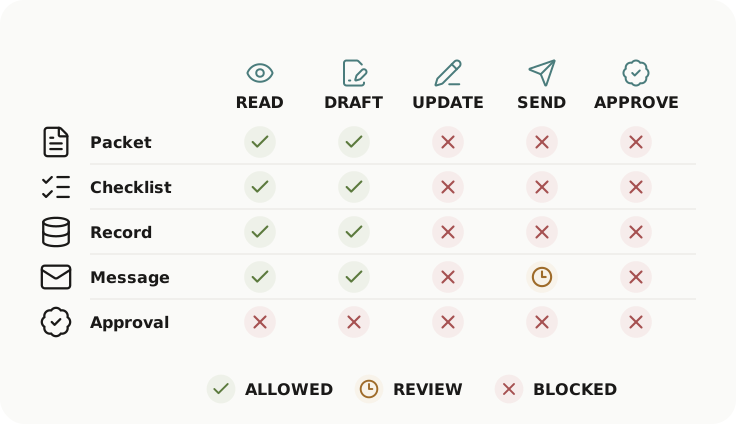
The permissions matrix used in a broader review illustrates resources against actions—read, draft, update, send, and approve. It helps test what the agent can do within a context; it does not depict audience, workspace, or administrator boundaries.
Keep audience boundaries distinct from action permissions
An audience boundary asks who can access an experience or see its information. An action-permission review asks what the agent’s tools can read, create, update, send, or approve. The two interact, but either can fail independently: a correctly scoped public interface might still call an overly powerful tool, while a read-only tool might return information to the wrong audience.
In the support example, the public agent’s response comes from public help content, while a specialist can consult internal procedure in a separate work context. The administrator can manage the configuration, but the public visitor cannot change it. The team should verify that this is how the deployed path behaves before relying on the separation.
Map the boundary again when the audience, workspace members, context sources, deployment surface, or administrator group changes. For tool-by-tool questions, continue to review an agent’s tools and data access. For broader access risks, see permissions and boundaries and the security review checklist. AgentShelf’s current public description is on the Trust and Boundaries page; confirm product behavior against the configured path.